Search This Blog

Showing posts with label paper reading. Show all posts

Saturday, April 23, 2011

Paper Reading 25: Using Language Complexity to Measure Cognitive Load for Adaptive Interaction Design


Reference Information:
Title: Using Language Complexity to Measure Cognitive Load for Adaptive Interaction Design
Names of authors: M. Asif Khawaja, Fang Chen, Nadine Marcus
Presentation venue: IUI '10 Proceedings of the 15th international conference on Intelligent user interface
s

Summary:
Performing any task exerts some amount of cognitive load on the brain. This load increases as the complexity of the task and the number of the tasks increase. An adaptive interaction system, which is aware of the users’ current cognitive load, can change its response, presentation and interaction flow to improve users’ experience and their task performance. In this paper, the authors propose a novel speech content analysis approach for measuring users’ cognitive load, based on their language and dialogue complexity. The authors have analysed the transcribed speech of operators working in computerized incident control rooms and involved in highly complex bushfire management tasks in Australia. The resulting patterns of language complexity show significant differences between the speech from cognitively low load and high load tasks. The authors also discuss the value of using this approach of cognitive load measurement for user interface evaluation and interaction design improvement.

Discussion:
The paper was very interesting to read. I wasn't aware of the effect that cognitive load has on our actions how tasks with heavy cognitive should be performed. It was interesting to know that performing a job slowly delivers better performance is a task is very complex. I always thought that performing a job task slowly makes it ineffective, however, it does make sense that some tasks need to be performed slowly since more caution has to be taken while performing complex tasks.

Paper Reading 24: A Natural Language Interface of Thorough Coverage by Concordance with Knowledge Bases


Reference Information:
Title: A Natural Language Interface of Thorough Coverage by Concordance with Knowledge Bases
Names of authors: Yong-Jin Han, Tae-Gil Noh, Seong-Bae Park, Se Young Park, Sang-Jo Lee
Presentation venue: IUI '10 Proceedings of the 15th international conference on Intelligent user interfaces

Summary:
One of the critical problems in natural language interfaces is the discordance between the expressions covered by the interface and those by the knowledge base. In the graph- based knowledge base such as an ontology, all possible queries can be prepared in advance. As a solution of the discordance problem in natural language interfaces, this paper proposes a method that translates a natural language query into a formal language query such as SPARQL. In this paper, a user query is translated into a formal language by choosing the most appropriate query from the prepared queries. The experimental results show a high accuracy and coverage for the
given knowledge base.

Figure 1. Mismatch between expressions which are interpretable by a
NLI system and those answerable by a knowledge base.

Discussion:
The paper was fairly easy to understand, however, it is important to know what a natural language and a formal language is before reading this paper. Natural Language processing was something that we used in information storage and retrieval class. We used a toolkit called NLTK - Natural Language Tool Kit. Natural Language processing also has many application in the field of AI. The idea of translating a user query into a formal language by choosing the most appropriate query from the prepared queries is very novel and interesting.

Paper Reading 23: Personalized User Interfaces for Product Configuration

Reference Information:
Title: Personalized User Interfaces for Product Configuration
Names of authors: Felfernig Alexander, Mandl Monika, Tiihonen Juha, Schubert Monika, Leitner Gerhard
Presentation venue: IUI '10 Proceedings of the 15th international conference on Intelligent user interfaces

Summary:
Configuration technologies are well established as a foundation of mass customization which is a production paradigm that supports the manufacturing of highly-variant products under pricing conditions similar to mass production. A side-effect of the high diversity of products offered by a configurator is that the complexity of the alternatives may outstrip a user’s capability to explore them and make a buying decision. In order to improve the quality of configuration processes, the authors combine knowledge-based configuration with collaborative and content-based recommendation algorithms. In this paper the authors present configuration techniques that recommend personalized default values to users. Results of an empirical study show improvements in terms of, for example, user satisfaction or the quality of the configuration process.


Discussion:
I think the paper was pretty interesting, however, it was too technical and mathematical. There were no graphics or images in the paper. The paper had too many mathematical formulas and set notations and they weren't explained in the common man's language. Overall, the idea was very interesting, recommender systems are becoming more and more common on shopping websites and can be used as an excellent marketing tool.

Monday, April 11, 2011

Paper Reading 22: Social signal processing: detecting small group interaction in leisure activity

Reference:
Title: Social Signal Processing: Detecting Small Group Interaction in Leisure Activity
Names of authors: Eyal Dim, Tsvi Kuflik
Presentation venue: IUI '10 Proceedings of the 15th international conference on Intelligent user interfaces

Summary:
Social Signal Processing of small groups enables detection of their social context. Monitoring of the social context may be based on position proximity (as a pre-condition for conversation), and on voice communication (an evidence for interaction). Understanding of the social context of a
group may allow a system to intervene at the right moment and to suggest relevant services/information. This, in turn, may enhance the group members’ experience during leisure
activity. This study focuses on assessing the possibility of automatic detection of intra group interaction in a museum environment. It presents analysis and tools that intend to set the foundation for computer aided group interaction during leisure activities.


Discussion:
This tool can be used to study group interactions, group behavior of people and the crowd mentality. It can be used to differentiate in the behavior of people when they are present in a group. Understanding group behavior is very important for marketing of products. People can study the group interactions during various activities like conferences, sports or leisure activities.

Paper Reading #21: Raconteur: from intent to stories

Reference Information:

Title: Raconteur: from intent to stories
Authors: Pei-Yu Chi, Henry Lieberman
Conference: IUI '10 Proceedings of the 15th international conference on Intelligent user interfaces

Summary:

When editing a story from a large collection of media, such as photos and video clips captured from daily life, it is not always easy to understand how particular scenes fit into the intent for the overall story. Especially for novice editors, there is often a lack of coherent connections between scenes, making it difficult for the viewers to follow the story. In this paper, we present Raconteur is a story editing system that helps users assemble coherent stories from media elements, each annotated with a sentence or two in unrestricted natural language. It uses a Commonsense knowledge base, and the AnalogySpace Commonsense reasoning technique. Raconteur focuses on finding story analogies – different elements illustrating the same overall "point", or independent stories exhibiting similar narrative structures.

Figure 1.0 Raconteur - Screenshot

Discussion:
I am really excited and intrigued by the idea of arranging pictures to form a story. The idea did not sound novel in the beginning since this is what a movie essentially does, arrange consecutive pictures taken fraction of a second apart from each other. However, after looking at the screenshot I realized that using this tool, we can arrange our pictures in order to form a story. This can help us to remember not just the location where the picture was shot but also the events that occurred and the story surrounding the picture.

Monday, April 4, 2011

Paper Reading #20: iSlideShow: a content-aware slideshow system

Reference Information

Title: iSlideshow: a Content-Aware Slideshow System
Authors: Jiajian Chen, Jun Xiao, Yuli Gao
Conference: IUI '10 Proceedings of the 15th international conference on Intelligent user interfaces

Summary
The authors present an intelligent photo slideshow system that automatically analyzes thematic information about the photo collection and utilizes such information to generate compositions and transitions in two modes: story-telling mode and person-highlighting mode. In the story-telling mode the system groups photos by a theme-based clustering algorithm and multiple photos in each theme cluster are seamlessly tiled on a slide. Multiple tiling layouts are generated for each theme cluster and the slideshow is animated by intra-cluster transitions. In the person-highlighting mode, the system first recognizes faces from photos and creates photo clusters for individuals. It then uses face areas as ROI (Regions of Interests) and creates various content-based transitions to highlight individuals in a cluster. With an emphasis on photo content, our system creates slideshows with more fluid, dynamic and meaningful structure compared to existing systems.

Figure 1.0 iSlideShow Interface

Discussion

Paper Reading 19: From documents to tasks: deriving user tasks from document usage patterns


Reference Information

Title: From Documents to Tasks: Deriving User Tasks from Document Usage Patterns
Authors: Oliver Brdiczka
Conference: IUI '10 Proceedings of the 15th international conference on Intelligent

Summary
A typical knowledge worker is involved in multiple tasks and switches frequently between them every work day. These frequent switches become expensive because each task switch requires some recovery time as well as the reconstitution of task context. First task management support systems have been proposed in recent years in order to assist the user during these switches. However, these systems still need a fairly big amount of investment from the user side in order to either learn to use or train such a system.

In order to reduce the necessary amount of training, this paper proposes a new approach for automatically estimating a user’s tasks from document interactions in an unsupervised manner. While most previous approaches to task detection look at the content of documents or window titles, which might raise confidentiality and privacy issues, our approach only requires document identifiers and the temporal switch history between them as input.

The prototype system monitors a user’s desktop activities and logs documents that have focus on the user’s desktop by attributing a unique identifier to each of these documents. Retrieved documents are filtered by their dwell times and a document similarity matrix is estimated based on document frequencies and switches. A spectral clustering algorithm then groups documents into tasks using the derived similarity matrix. The described prototype system has been evaluated on user data of 29 days from 10 different subjects in a corporation. Obtained results indicate that the approach is better than previous approaches that use content.

(Figure 1: Average precision, recall and F-measure with respect
to the number of user tasks)

Discussion
This paper was pretty technical. The authors, no doubt, comes from a highly technical background and his writing reflects this fact. However, I has taken the information storage and retrieval class last semester and I am quite familiar with the terms - clustering, F-measure, precision, recall, etc. that he uses in the paper. I think this system will be very useful since we switch between numerous tasks multiple times each day. Software like this would significantly improve work efficiently and reduce the downtime caused due to task switching.

Paper Reading 18: Evaluating the design of inclusive interfaces by simulation


Reference Information:

Title: Evaluating the Design of Inclusive Interfaces by Simulation.
Authors: Pradipta Biswas, Peter Robinson.
Conference: IUI '10 Proceedings of the 15th international conference on Intelligent user interfaces.

Summary:

The authors have developed a simulator to help with the design and evaluation of assistive interfaces. The simulator can predict possible interaction patterns when undertaking a task using a variety of input devices, and estimate the time to complete the task in the presence of different disabilities.
They have evaluated the simulator by considering a representative application being used by ablebodied, visually impaired and mobility impaired people. In the study that they conducted, they compared the simulator's predictions of the time it would take for people with impairment for performing various tasks vs. the time it would take for accomplishing these tasks for other users.
The simulator predicted task completion times for all three groups with statistically significant accuracy. The simulator also predicted the effects of different interface designs on task completion time accurately.

(Fig 1.0 Use of the simulator)


Discussion:
After reading this paper, I have an opinion that this is not a paper that presents a research idea or something that's new in the field. Instead, it presents results of the user study that the researchers conducted. They present their findings and this valuable piece of data can be used by other researchers to develop new applications and systems.

Paper Reading #17: Mobia Modeler: easing the creation process of mobile applications for non-technical users


Reference Information:

Title: Mobia Modeler: Easing the Creation Process of Mobile Applications for Non-Technical Users

Authors: Florence Balagtas-Fernandez, Max Tafelmayer, Heinrich Hussmann

Conference: IUI '10 Proceedings of the 15th international conference on Intelligent user interfaces

Summary:
In this paper, the authors talk about the tools that they developed called the Mobia Modeler. This tool is aimed at the users without technical background or programming expertise. It facilitates these users to develop mobile phone apps.

The development of mobile applications has now extended from mobile network providers into the hands of ordinary people as organizations and companies encourage people to come up with their own software masterpieces by opening up SDKs, APIs and other development tools.

However, as of the moment, these APIs and tools are only usable by people with programming skills. There is a scarcity of tools that enable users without programming experience to easily build customized mobile applications.

The paper talks about Platform Independent Model and Platform Specific Model. The users create apps using the graphical user interface and the program translates the graphical model to the code taking into consideration the relationship between different modules.

In this paper, the authors present a tool and framework that would enable non-technical people to create their own domain-specific mobile applications. The tool features a simple user-interface that features configurable components to easily create mobile applications. As a proof of concept, they focus on the creation of applications in the domain of mobile health monitoring.


Discussion:
I don't think this program can be used to develop complex applications, however, it can be very easily used to develop simple apps designed to solve simple tasks. I am currently developing a phone app and the process is indeed time-consuming. I can see how this program will generate a huge inflow of app developers and an exponential increase in the number of apps available in the app market.

Paper Reading #16: Mixture Model based Label Association Techniques for Web Accessibility

Reference Information:

Title: Mixture Model based Label Association Techniques for Web Accessibility

Authors: Muhammad Asiful Islam, Yevgen Borodin, I. V. Ramakrishnan

Conference: UIST '10 Proceedings of the 23nd annual ACM symposium on User interface software and technology

Summary:
The internet used to consist of text-based pages, but today the internet has grown into a massive chunk of data. The information is growing exponentially each day. However, many websites are not designed for blind users. An important aspect of making the Web accessible to blind
users is ensuring that all important web page elements such
as links, clickable buttons, and form fields have explicitly
assigned labels. Properly labeled content is then correctly
read out by screen readers, a dominant assistive technology
used by blind users.

Improperly labeled form
fields can critically impede online transactions such as
shopping, paying bills, etc. with screen readers. Very often
labels are not associated with form fields or are missing
altogether, making form filling a challenge for blind users.
Algorithms for associating a form element with one of several
candidate labels in its vicinity must cope with the variability
of the element’s features including label's location
relative to the element, distance to the element, etc. Probabilistic
models provide a natural machinery to reason with
such uncertainties. In this paper, the authors present a Finite Mixture
Model (FMM) formulation of the label association problem.
The variability of feature values are captured in the FMM
by a mixture of random variables that are drawn from parameterized
distributions. Then, the most likely label to be
paired with a form element is computed by maximizing the
log-likelihood of the feature data using the Expectation
Maximization algorithm.
The FMM approach was also adopted for two related problems: assigning labels from an external
Knowledge Base to form elements that have no candidate
labels in their vicinity and for quickly identifying clickable
elements such as add-to-cart, checkout, etc., used in online
transactions even when these elements do not have textual
captions e.g., image buttons without alternative text. The authors provide
a quantitative evaluation of their techniques, as well as
a user study with two blind subjects who used an aural web
browser implementing the approach.

The results of the experiments showed that after using VSM, 95% of the web elements were correctly labeled. Couple of blind users were asked questions and feedback to rate the system on the Likert scale. Both the users gave a very postive feedback and mentioned that they've always had problems filling out the online forms but this task was made easy after the web elements in the forms were properly labeled.

Discussion:
This idea is one example of how technology can be used to change lives. Technology has tremendous potential to benefit people. The paper does a great job at increasing the accessibility of the web for the blind users.
Overall, the paper was quite technical and presented the reader with complex mathematical formulas and code segments that were not quite comprehensible in the first reading.

Sunday, March 20, 2011

Paper reading #15: TurKit: human computation algorithms on mechanical turk


Reference Information:

Title: TurKit: Human Computation Algorithms on Mechanical Turk

Authors: Greg Little, Lydia B. Chilton, Max Goldman, Robert C, Miller

Conference
: UIST '10 Proceedings of the 23nd annual ACM symposium on User interface software and technology

Summary:
Mechanical Turk (MTurk) provides an on-demand source of human computation. This provides a tremendous opportunity to explore algorithms which incorporate human computation as a function call. Amazon uses such a mechanical turk in which users are paid small amounts of money for completing the human intelligence tasks (HITS) like writing product reviews. However, various systems challenges make this difficult in practice, and most uses of MTurk post large numbers of independent tasks. TurKit provides an API written in JavaScript for accomplishing MTurk Tasks. TurKit is a toolkit for prototyping and exploring algorithmic human computation, while maintaining a straight-forward imperative programming style. The authors present the crash-and-rerun programming model that makes TurKit possible, along with a variety of applications for human computation algorithms. The authors also present case studies of TurKit used for real experiments across different fields. The crash-and-rerun model favors usability over efficiency, but does so at an inherent cost in scalability. So, one of the major limitations of this system is expensive space complexity.

Discussion:
Companies like Amazon.com, ebay, other e-commerce companies and companies that rely on customer ratings have been using mechanical turks for quite some time now. They have to stick to this procedure since these tasks require human intelligence and can not be achieved using computer algorithms. These systems have a drawback when it comes to scalability, but with modern processors and cheap storage solutions, that doesn't quite seem to be an issue.

The name Mechanical Turk comes from "The Turk," a chess-playing automaton of the 18th century, which was made by Wolfgang von Kempelen


Paper reading #14: A framework for robust and flexible handling of inputs with uncertainty

Reference Information:
Title: A Framework for Robust and Flexible Handling of Inputs with Uncertainty
Authors: Julia Schwarz, Scott E. Hudson, Jennifer Mankoff, Andrew D. Wilson
Conference: UIST '10 Proceedings of the 23nd annual ACM symposium on User interface software and technology

Summary:
New input technologies like touch, recognition based input such as pen gestures and next generation interactions all provide for more natural user interfaces. However, these techniques all create inputs with some uncertainty. Conventional infrastructure lacks a method for easily handling uncertainty, and as a result input produced by these technologies is often converted to conventional events as quickly as possible, leading to a stunted interactive experience. The authors present a framework for handling input with uncertainty in a systematic, extensible, and easy to manipulate fashion.
Using the various touch inputs from the user, a probabilistic finite state machine can be developed and used to solve the ambiguity in certain inputs. These inputs include scenarios when the user touch the area half-way between the two options/buttons. In this case, probabilistic finite state machine can be used to resolve the conflicting inputs.
To illustrate this framework, they present several traditional interactors which have been extended to provide feedback about uncertain inputs and to allow for the possibility that in the end that input will be judged wrong or end up going to a different interactor. The six demonstrations conducted by the researchers included tiny buttons that were manipulable using touch input, a text box that could handle multiple interpretations of spoken input, a scrollbar that could respond to inexactly placed input, and buttons which were easier to click for people with motor impairments. The framework supports all of these interactions by carrying uncertainty forward all the way through selection of possible target interactors, interpretation by interactors, generation of uncertain candidate actions to take, and a mediation process that decides in a lazy fashion which actions should become final.


Discussion:
The paper talks about an excellent idea that's now being put to use. Today, more and more devices have touch screens. Soon, hardware buttons and controls will be replaced by touch screens on all the devices. When the primary method of interaction is touch, it becomes vital to resolve such annoying issues. This research has already been incorporated in many vitual keyboards. On iphones and iPads, when the user types words, he/she often makes mistakes since the letters are placed very close to each other. However, the algorithm computes the probabilities and displays the character that is most often times that character that the user intended to use.

Saturday, February 26, 2011

Paper Reading #13: Gestalt: Integrated Support for Implementation and Analysis in Machine Learning

Reference Information:

Title: Gestalt: Integrated Support for Implementation and Analysis in Machine Learning
Authors: Kayur Patel, Naomi Bancroft, Steven M. Drucker, James Fogarty, Andrew J. Ko, James A. Landay
Conference: UIST '10 Proceedings of the 23nd annual ACM symposium on User interface software and
technology

Summary:
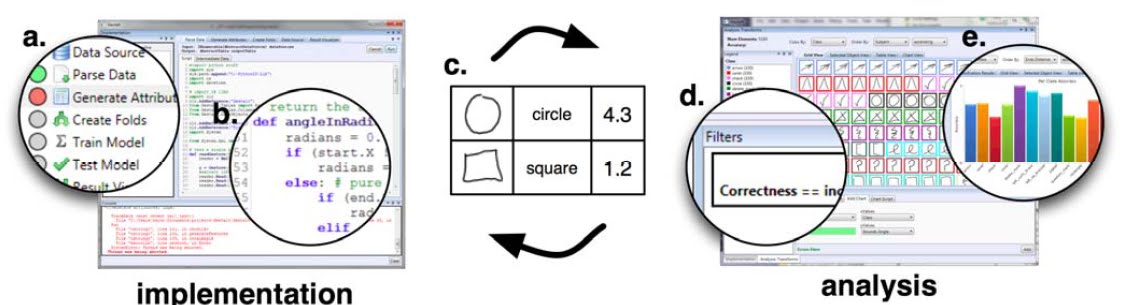
This paper talks about Gestalt, a development environment designed to support the process of applying machine learning. While traditional programming environments focus on source code, Gestalt explicitly supports both code and data. Gestalt allows developers to implement a classification pipeline, analyze data as it moves through that pipeline, and easily transition between implementation and analysis. An experiment showed that this significantly improved the ability of developers to find and fix bugs in machine learning systems. Gestalt provides new insight into general-purpose support for the machine learning process. Gestalt allows the developers to graphically implement a classification pipeline and analyze the data. The developer can graphically switch back and forth between two operations. The way this was implemented was using add-on widgets to existing IDEs like Eclipse and MS Visual Studio. They added widgets to perform tasks like parse data, train and test models.


Discussion:
I can understand how helpful this software will be in developing machine learning algorithms. It's extremely difficult to visualize the working from the lines of code that you've written and finding bugs is even harder. This IDE plugin will immensely help developers like you and me to visualize the data, spot the discrepancies and fix the bugs. Similar tools will save a lot of time spent in the debugging process and increase efficiency.

Paper Reading #12: Pen + Touch = New Tools

Reference Information

Title: Pen + Touch = New Tools
Names of authors: Ken Hinckley, Koji Yatani, Michel Pahud, Nicole Coddington, Jenny Rodenhouse, Andy Wilson, Hrvoje Benko, and Bill Buxton
Conference: UIST '10 Proceedings of the 23nd annual ACM symposium on User interface software and technology

Summary:
Prior to this research, we had multi-touch interfaces (usually using a capacitive touch screen) and pen-touch interface (usually using a resistive touch screen). However, with the age of tablet computers, it was required to have an interface that allows users to touch and perform gestures with fingers and in addition to that, use pen for inking and note-taking. This paper presents a research that makes this possible. They used a Microsoft Surface and a LED pen for this experiment. In this paper, the authors describe techniques for direct pen+touch input. The motivation came from observing people’s manual behaviors with physical paper and notebooks. These serve as the foundation for a prototype Microsoft Surface application, centered on note-taking and scrapbooking of materials. Based on the observations and explorations, the authors advocate a division of labor between pen and touch: the pen writes, touch manipulates, and the combination of pen + touch yields new tools. This articulates how the system interprets unimodal pen, unimodal touch, and multimodal pen+touch inputs, respectively. For example, the user can hold a photo and drag off with the pen to create and place a copy; hold a photo and cross it in a freeform path with the pen to slice it in two; or hold selected photos and tap one with the pen to staple them all together. Touch thus unifies object selection with mode switching of the pen, while the muscular tension of holding touch serves as the glue that phrases together all the inputs into a unitary multimodal gesture. This helps the UI designer to avoid encumbrances such as physical buttons, persistent modes, or widgets that detract from the user’s focus on the workspace.


Discussion:
Today, we are getting rid of the physical hardware buttons from our electronics and substituting them with touch screen. People are rapidly switching to tablets, touch based ebook readers, touch based navigations systems etc. I think this research is revolutionary and provides a major breakthrough in the area of HCI. Some tablets like the iPad do not support pen interaction, while a keyboard is displayed on the screen and the respective keys can be touched to enter the information. However, many people aren't comfortable with this input method. Therefore, some newer tablets like the HP slate and Asus eee slate support multi touch and pen interface making the device ideal for browsing information and for inking / note-taking.


Application:
Wacom Bamboo Pen & Touch

Monday, February 21, 2011

Paper Reading# 11: Hands-on math: a page-based multi-touch and pen desktop for technical work and problem solving

Reference Information
Title: Hands-On Math: A page-based multi-touch and pen desktop for technical work and problem solving
Names of authors: Robert Zeleznik, Andrew Bragdon, Ferdi Adeputra, Hsu-Sheng Ko
Presentation venue: UIST '10 Proceedings of the 23nd annual ACM symposium on User interface software and technology

Summary:
Students, professionals and engineers have to choose between flexible, free-form input of pencil and paper and the computational power of Computer Algebra Systems (CAS). There is no method of interaction or technology that incorporates the two into something that's one easy-to-use, yet powerful, thus reducing the barriers in accessing computational algebra systems while solving math problem. Hands-On Math is a multi-touch and pen-based system which attempts to unify these approaches by providing virtual paper that is enhanced to recognize mathematical notations as a means of providing in situ access to the CAS functionality. It uses Microsoft Surface that runs on a tabletop screen and StarPad SDK to convert handwritten mathematical equations to digital format. Pages can be created and organized on a large pannable desktop and mathematical expressions can be computed, graphed and manipulated using a set of uni and bi-manual interactions which facilitate rapid exploration by eliminating tedious and error prone transcription tasks. Analysis of a qualitative pilot evaluation indicated the potential of the approach and highlighted the issues with the novel techniques used.


Discussion:
The idea of incorporating hand gestures and solving of math equations is brilliant. I have myself been in such situations before, and have been lazy to plug in the equations into CAS. Writing the equations on smart whiteboards and using gesture recognition to recognize the equations and converting them to digital format will make the task very easy and save a lot of time.

Paper Reading #10: PhoneTouch: a technique for direct phone interaction on surfaces


Reference Information:
Title: PhoneTouch: a technique for direct phone interaction on surfaces
Authors: Dominik Schmidt, Fadi Chehimi, Enrico Rukzio, Hans Gellersen
Conference: User Interface Software and Technology 2010

Summary:
This paper talks about PhoneTouch - a novel technique for integration of mobile
phones and interactive surfaces. The technique enables use
of phones to select targets on the surface by direct touch, facilitating
for instance pick&drop-style transfer of objects between
phone and surface. The technique is based on separate
detection of phone touch events by the surface, which determines
location of the touch, and by the phone, which contributes
device identity. The device-level observations are
merged based on correlation in time. In the paper, the authors describe a proof of-
concept implementation of the technique, using vision for
touch detection on the surface including discrimination of
finger versus phone touch and acceleration features for detection
by the phone.

(Fig. PhoneTouch enables direct phone interaction on surfaces alongside conventional multi-touch.)

Discussion:
I think the idea of using a collaborative touch surface with phones is really interesting. It can be used in home as well as in office. In office, documents can be drag-n-dropped on the surface to share them with everyone, at home pictures and movies can be shared by dragging them from the phone onto the the collaborative surface. I believe this technology has already been put to use in developing certain multimedia application, iphone apps etc.

Paper Reading #9: Imaginary interfaces: spatial interaction with empty hands and without visual feedback

Reference Information
Title: Imaginary Interfaces: Spatial Interaction with Empty Hands and without Visual Feedback
Names of authors: Sean Gustafson, Daniel Bierwirth, Patrick Baudisch
Presentation venue: UIST '10 Proceedings of the 23nd annual ACM symposium on User interface software and technology

Summary:
Current screen-less devices only support buttons and gestures. Screen-less wearable devices allow for the smallest form factor and thus the maximum mobility. Pointing is not supported because users have nothing to point at. However, the designers challenge the notion that spatial interaction requires a screen and propose a method for bringing spatial interaction to screen-less devices.
In this paper, the authors present Imaginary Interfaces, screen-less devices that allow users to perform spatial interaction with empty hands and without visual feedback. Unlike projection-based solutions, such as Sixth Sense, all of the spatial information is contained in the user's mind and all interaction is done relative to the user's frame of reference. Users define the origin of an imaginary space by forming an L-shaped coordinate cross with their non-dominant hand. Users then point and draw with their dominant hand in the resulting space.
With three user studies the authors investigated the question: To what extent can users interact spatially with a user interface that exists only in their imagination? Participants created simple drawings, annotated existing drawings, and pointed at locations described in imaginary space. Their findings suggested that users’ visual short-term memory can, in part, replace the feedback conventionally displayed on a screen. The authors propose a design for such a device, which works by illuminating the user's hands with infrared light, applying a luminance threshold, and discerning the structures that comprise the imaginary interface


Discussion:
The idea and the concept is very interesting. Such methods of interactions are gaining increasing importance, we have already seen the famous research - Sixth Sense done at MIT. However, the users will have to remember hundreds of gestures for performing various tasks, which can be annoying. Also, the gesture recognition has to be really accurate, since there is a good chance that two gestures might look similar and the algorithm may confuse one for another, thus annoying the user. Lastly, consider this situation ten years down the road, everyone having a wearable computer and performing gestures in air, that would be a little weird, I think....everyone waving hand and circling their hands. However, if it brings convenience, other things don't really matter.

Thursday, February 10, 2011

Paper Reading #8:Communicating Software Agreement Content Using Narrative Pictograms


Reference
Title: Communicating Software Agreement Content Using Narrative Pictograms
Authors: Kay Matthew and Terry Michael
Presentation Venue: CHI 2010, April 10–15, 2010, Atlanta, Georgia, USA.

The functional overview provided to describe the fact that the ingimp software collects usage data that is sent to a website

Summary
Central Idea: using pictures instead of text to convey the End User Software License Agreements to the users.
This paper talks about narrative pictograms i.e. diagrams designed to convey the abstract concepts of a software agreement. Narrative pictograms arose out of a need to increase
the chance that subjects of any culture or language could understand the purposes and intent of a consent agreement accompanying publicly available experimental software. Accordingly, the diagrams presented in the paper were designed to be used without the aid of explanatory text. The authors first present their iterative design process and initial formative evaluation of the diagrams and then present example diagrams designed to describe the data collection policies of research software, and the more general composition rules used to create them. Finally, the authors demonstrate the diagrams’ ability to effectively communicate concepts by presenting results from an experimental study.

Discussion
I completely agree with the notion of using narrative pictograms to convey the End User Software License Agreements to the users. I never read the user agreements myself due the lengthy and verbose nature of the agreements. Most users don't read these agreements and click on the "I agree" button to proceed with the software installation. This shows ignorance from the user's side and gives complete freedom to the companies to sue the user in case he/she violates the agreement. I think using pictures instead of thousands of words gives a better idea to the user about his/her responsibilities and does it quickly.

Paper Reading #7: Hard to use interfaces considered beneficial (some of the time)

Reference Information:
Title: Hard to use interfaces considered beneficial (some of the time)
Authors: Riche Yann, Riche Nathalie, Isenberg Petra and Bezerianos Anastasia.
CHI 2010, April 10–15, 2010, Atlanta, Georgia, USA.

Summary:
Researchers in HCI share a common understanding that ‘easy-to-use’, ‘easy-to-learn’ and ‘intuitive’ interfaces are beneficial to users. Designing such interfaces raises challenges and often requires multiple iterations. While the designers are generally prompted to discard more hard-to-use interfaces and smooth out usability issues, this paper talks about their potential benefits. The researchers observed potential benefits from introducing barriers for collaborating and communicating with others. The authors attempt to shed a new light on interfaces with usability problems and how these problems may benefit system efficiency and user experience. Authors state that that barriers in interfaces can benefit game play, learning, to guide users to improve their efficiency with advanced features, and more broadly the experience with a system.

Discussion:
In the experiment, the researchers purposely induced some barriers in the user interface and recorded the observations. They found that having some barriers and limiting communication can enhance the learning experience. Also, the users get a sense of achievement after they have learnt something after consistently trying. However, I don't quite share the same ideas. I think if the user finds an alternative more easy-to-use solution in the market, he/she will most likely buy that product. Users get easily frustrated since most people don't have enough patience. Overall, the authors did provide an interesting idea, but it wasn't very convincing for me.

Wednesday, February 2, 2011

Paper Reading #6 - Blowtooth: Pervasive gaming in Unique and Challenging Environments


Reference Information
Title: Blowtooth: Pervasive Gaming in Unique and Challenging Environments
Names of authors: Conor Linehan, Ben Kirman, Shaun Lawson, Mark Doughty
Presentation venue: CHI 2010, April 10–15, 2010, Atlanta, Georgia, USA.

Summary:
The paper talks about a cellphone game called Blowtooth. Blowtooth has been developed to explore the limits of pervasive gaming in public spaces where the constant surveillance of law-abiding and innocuous behavior has become the everyday norm.
The game is specifically designed to exploit the affordances of a particular class of public space - namely international airports - in which people are subject to particularly high levels of intrusive surveillance and security monitoring. Even in everyday experience (i.e. outside of a game) such surveillance can be both simultaneously thrilling and frightening; the possibility of harnessing these sensations in a game - or indeed any other art form - has great potential.
Blowtooth is further designed with a fictional narrative theme that is deliberately provocative given the environment in which it is set i.e. the game-play involves the covert smuggling of drugs through airport security checks. In reality, of course, no drugs are involved and the game simply polls a player's vicinity for Bluetooth devices, produces a list of these devices and allows the player to conceptually dump or retrieve contraband on or off one or more devices in the list. No interaction with the other devices - or their owners - is made other than to discover the anonymous and factory allocated hardware addresses. Usage of Bluetooth in this way is common - even in airports.

Discussion:
Initially I thought that the idea sounded very lame. I would rather prefer to play other FPS or racing games on my cell phone, listen to music or read a book while I am at the airport. However, the idea of making it multi-player using bluetooth is very creative. It definitely adds excitement to the game. I guess, I won't realize how fun the game is unless I play it for myself but I can see how it can add adventure to the boring experience of air travel. I checked out the blowtooth game website and many people world wide are already playing this game on their phones and setting new records, so I bet it must be exciting.